Carry Forward Accounts
Carry Forward Accounts - User Guide
ℹ️
⚡ Quick Start: Closing the Year
- Access: Navigate to System Tools > Carry Forward Accounts.
- Review: Ensure all transactions for the current year (March 31st) are recorded and reconciled.
- Execute: Select the Target Database/Year and click Carry Forward.
- Verify: Check the Opening Balances in the new year to ensure they match the previous year’s closing.
🗺️ Year-End Lifecycle
graph TD
    Audit[Complete Year-End Audit] --> Carry[Run Carry Forward Utility]
    Carry --> NewYear[New Financial Year Database]
    NewYear --> Opg[Populate Opening Balances]
    Opg --> FirstInv[Generate April Invoices]

    style Carry fill:#f9f,stroke:#333,stroke-width:2px
1. Introduction 📝
The Carry Forward Accounts tool is a critical utility used once a year (typically in March/April). It takes the final “Closing Balance” of every Assets and Liability ledger and sets it as the “Opening Balance” for the next financial year.
2. Functions Performed 🔄
- 📊 Ledger Transfer: Moves closing balances of Bank, Cash, Fixed Deposits, and General Funds.
- 👨👩👧👦 Member Dues: Moves the pending arrears of every member into the new year.
- 🏢 Vendor Dues: Carries forward any unpaid bills for contractors and utility providers.
- 📉 BSIE Alignment: Ensures that the structure defined in the BSIE Master is also migrated to the new year.
3. Related Reports 📊
- 🏛️ Carry Forward Log: A system audit report showing exactly which balances were moved and by whom.
- 📋 Year-End Checklist: A guiding report to ensure transactions are finalized before the carry forward is run.
4. Key Considerations 🔍
- Finality: Ensure all audited adjustments (like Depreciation or Reserve Fund transfers) are done before running this.
- Member Mapping: The system ensures each member occupies the same “Flat” identity in the new year for billing continuity.
5. Interface Walkthrough 🔄
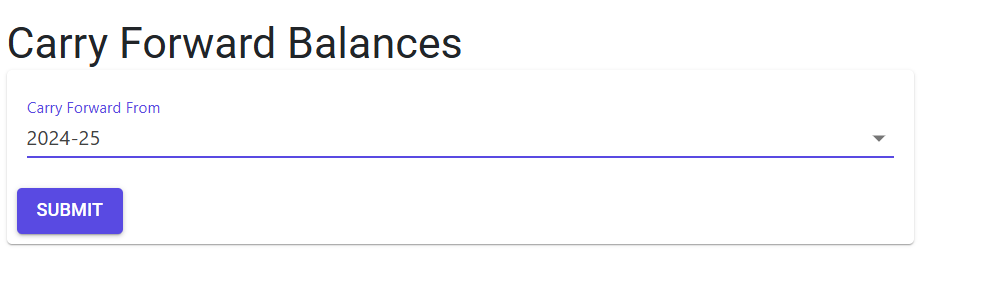
Execute Carry Forward
The Carry Forward screen is a simple but powerful tool for financial year transitions.
- Select Year: Use the Carry Forward From dropdown to select the source financial year you wish to close.
- Submission: Click Submit to trigger the automated balance transfer process.
- Safety First: The system will perform pre-run checks to ensure data integrity before proceeding.
6. Validations and Error Handling ⚠️
| Validation Type | What is checked? | Error Message / Action |
|---|---|---|
| Audit Lock | If the previous year’s books aren’t formally closed. | System may display a warning about “Un-reconciled Vouchers”. |
| Duplicate Year | If the target year already has data. | Prevents accidental overwriting of existing transaction data. |
7. Best Practices / Tips 💡
ℹ️
- Backup First: Always perform a complete database backup before running the Carry Forward utility.
- Run Mid-Year (Draft): You can run a “Draft Carry Forward” to start the new year’s billing even if the final audit isn’t complete. You can then “Re-Run” it once the auditor provides final adjustments.
- Reconcile Members: Ensure that all Member receipts for the old year are posted before carrying forward to avoid incorrect “Arrears” in the new year.
- Check BSIE Totals: After carrying forward, verify that Total Assets = Total Liabilities in the new year’s Opening Balance sheet.