GST Rate Master
GST Rate Master - User Guide
ℹ️
⚡ Quick Start: Setting Tax Rates
- Access: Navigate to System Tools > GST Rate Master.
- Review: View the standard rates (0%, 5%, 12%, 18%, 28%).
- Linkage: These rates are used when defining a Standard Tariff.
- Calculations: The system uses these rates to auto-calculate CGST, SGST, and IGST on every bill.
1. Introduction 📝
The GST Rate Master stores the different tax brackets as mandated by the Government of India. Every time you create an invoice for a taxable service (like “Repairs” or “Clubhouse Rent”), the system refers to this master to find the correct percentage to apply.
2. Usage in Transactions 🔄
- 📄 Sales Invoices: Automatically calculates tax on maintenance and other services.
- 🧾 Purchase Bills: Used to record the GST paid to vendors, which the society can later claim as Input Tax Credit.
- 📈 Late Payment Interest: If the society charges GST on interest, the rate is pulled from here.
3. Related Reports 📊
- 📋 GSTR-1 Summary: Groups all your sales (invoices) by their GST rate (e.g., “Total 18% Sales”).
- 📋 GSTR-3B Summary: A consolidated view of your tax liabilities vs. your input credits.
- 📉 Tax Component Breakdown: Shows the individual split of CGST, SGST, and IGST for audit purposes.
4. Interface Walkthrough 🔄
Browse GST Rates
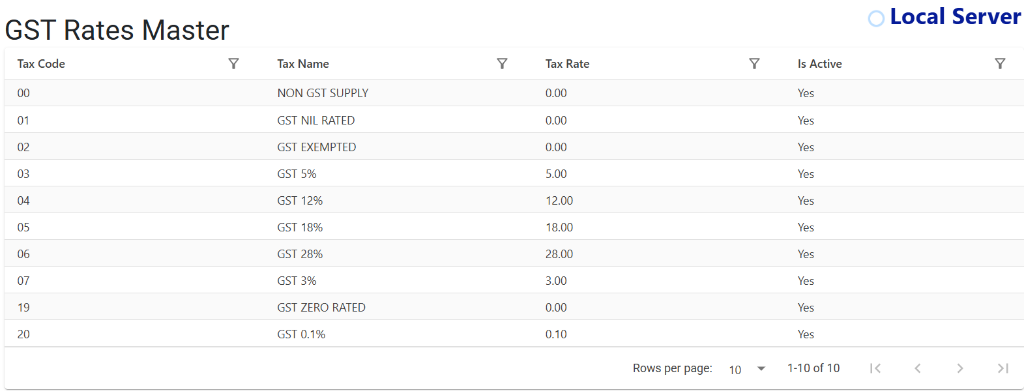
The GST Rates Master Index provides a definitive list of all tax configurations available in the system.
- Tax Code Mapping: Use the unique Tax Codes to quickly identify government-mandated brackets.
- Consolidated View: Monitor the Tax Name and Tax Rate side-by-side to ensure compliance at a glance.
- Operational Readiness: Easily verify the Is Active status to ensure only valid tax brackets are available for selection during billing.
5. Validations and Error Handling ⚠️
- Mandatory Rate: Every taxable service must have a linked GST rate. If a rate is missing, the system may prevent the invoice from saving to avoid non-compliant billing.
- In-Active Rates: If a tax rate is no longer used by the government, mark it “In-Active” rather than deleting it to protect historical reports.
6. Best Practices / Tips 💡
ℹ️
- Use SAC Codes: Always ensure you have the correct Service Accounting Code (SAC) linked to your GST rates for professional invoice printing.
- Don’t Overwrite: If the GST rate for a service changes from 12% to 18%, create a new tariff or update the linkage; do not simply change the “12” to “18” in the master as it will corrupt your past financial years’ data.
- Exempt vs Nil-Rated: Be precise when marking services as “Exempt” (0%) to ensure your GST returns are technically accurate.