Visual Match Off
Visual Match Off - User Guide
📈 Business Impact
The Visual Match Off module is the ultimate tool for “Account Cleaning.” It allows you to settle hundreds of outstanding invoices against existing unadjusted payments in bulk. This ensures your Ageing Reports and Outstanding Statements are accurate and only show truly unpaid items.
⚡ Quick Start: 5-Minute Settlement
- Identify: Run your Member/Vendor Outstanding Report to find unadjusted items (e.g., a payment of ₹5000 and an invoice of ₹5000 that aren’t linked).
- Setup: Go to Finance > Visual Match Off. Select the type (Member or Vendor).
- Download Model: Click Download Model.
- Match Data:
- Enter the Doc Type and Member/Vendor ID.
- Enter the Ref No (e.g., SI number) and Amount.
- Enter the matching Payment/Receipt details on the next line.
- Upload: Upload the file. The system validates that the Net Total is 0.
- Confirm: Once validated, the system “knocks off” these balances permanently.
🗺️ Match Off Workflow
graph TD
    Identify[Identify Unlinked Items] --> Download[Download Match-Off Model]
    Download --> Entry[Enter Bill & Payment Pairs]
    Entry --> Validation[Check: Batch Total must be 0]
    Validation --> Upload[Upload & Process]
    Upload --> Cleanup[Clean Ageing Report]

    style Validation fill:#fef2f2,stroke:#ef4444
    style Cleanup fill:#f0fdf4,stroke:#16a34a
✅ Prerequisites Checklist
- Outstanding Report: Have a clear list of invoice/payment pairs you wish to settle.
- Account IDs: Ensure you have the 6-digit Member or Vendor IDs.
- Unique Pairs: Every bill must be matched with a corresponding credit/payment to balance the batch.
1. Introduction 📝
Commonly, payments are received “On Account” (OA) without linking them to a specific invoice. Over time, this creates a situation where a member has a zero balance but dozens of “outstanding” invoices and “unadjusted” payments. Visual Match Off solves this by letting you “visually” pair them in Excel and tell the system: “Adjust this payment against that bill.”
2. Advanced Features 🛠️
⚖️ The Zero-Sum Rule
The most critical rule of Visual Match Off is the Net Zero Validation:
- Every debit (Invoice) must be offset by an equal credit (Payment/Receipt) in the same upload batch.
- The system scans the Net column. If the sum of all lines is not exactly zero, the upload will fail with Error B.
🔄 Multi-Document Support
You can match various document types in one go:
- SI: Sales Invoice (Member)
- PB: Purchase Bill (Vendor)
- OA: On-Account Receipt
- AD: Advance Payment
- SCN/PDN: Credit and Debit Notes
3. Interface Walkthrough 🔄
Prepare & Upload Data
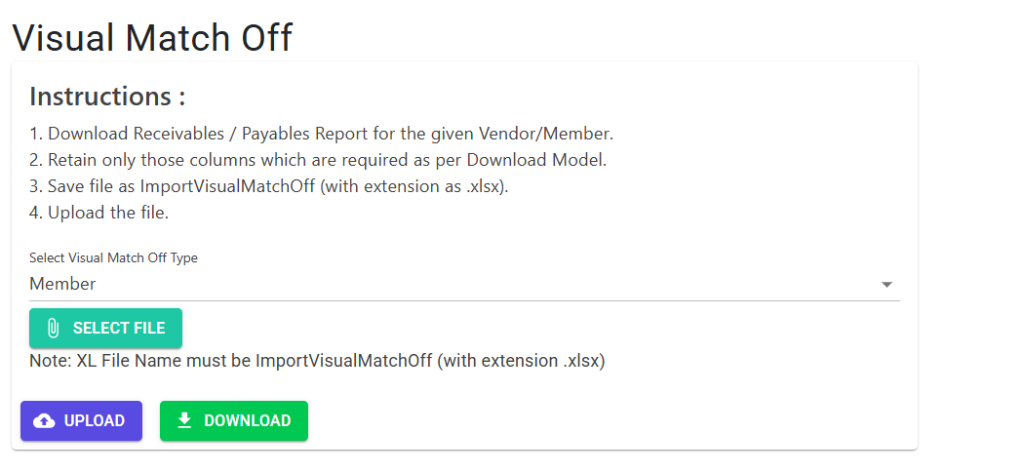
The Settlement Screen guides you through the bulk adjustment process with clear, step-by-step instructions for data preparation.
- Select Type: Choose whether you are matching outstanding items for a Member or a Vendor.
- Instructions:
- Download the Receivables/Payables report to identify unlinked pairs.
- Format your file according to the Download Model.
- Save your excel file exactly as
ImportVisualMatchOff.xlsx.
- Execution: Click Select File to pick your Excel sheet and then click Upload to process the settlement.
4. Validations & Error Codes ⚖️
| Code | Logic |
|---|---|
| Z1 - Z7 | Data Format Errors: Incorrect date formats, ID lengths exceeding 6 digits, or invalid document types. |
| Error A | Referential Integrity: The Ref Doc provided is not a recognized type (must be OA, AD, PB, or SI). |
| Error B | Imbalance: The total “Net” amount in your Excel sheet does not equal 0.00. |
| Error C | Invalid ID: The Member or Vendor ID does not exist in the system. |
| Error D | Reference Check: The Ref No or Doc No provided does not exist in the ledger for that specific member/vendor. |
5. Tips for Success 💡
- Batching: Don’t try to match a whole year in one sheet. Do it month-by-month for easier error tracking.
- Member IDs: Always use the Member ID (6 digits) and not the Flat Number.
- Partial Match: If you only want to settle ₹1000 of a ₹5000 bill, simply enter ₹1000 in the Amount column of that line. The remaining ₹4000 will stay outstanding.
- No Reversal: Visual Match Off directly updates the ledger links. Double-check your pairs before uploading!