GST State Master
GST State Master - User Guide
ℹ️
⚡ Quick Start: Location Logic
- Access: Navigate to System Tools > GST State Master.
- Review: Ensure state names and their 2-digit codes (e.g., 27 for Maharashtra) are correct.
- Linkage: These states are selected in the Entity Master, Member Master, and Vendor Master.
- Automation: The system compares these codes to determine the tax type automatically.
🗺️ How it Works: The Tax Logic
graph LR
    Society[Society State: 27] --> Compare{Compare}
    Recipient[Member State: 27] --> Compare
    Compare -- Matches --- Local[Apply CGST + SGST]

    Society2[Society State: 27] --> Compare2{Compare}
    Recipient2[Member State: 09] --> Compare2
    Compare2 -- Different --- Inter[Apply IGST]

    style Compare fill:#f9f,stroke:#333
    style Compare2 fill:#f9f,stroke:#333
1. Introduction 📝
The GST State Master contains the official list of Indian states and Union Territories along with their unique 2-digit codes. This is a critical data point for the “Place of Supply” rules under GST law.
2. Usage in Transactions 🔄
- 📄 Invoices: When billing a member, the system compares the society’s state with the member’s state. If they are the same (e.g., both in Maharashtra), it splits the tax into CGST and SGST.
- 🧾 Purchase Bills: When recording a bill from an out-of-state vendor (e.g., a software consultant from Bangalore billing a society in Mumbai), the system applies IGST based on the state codes.
3. Related Reports 📊
- 🏛️ Place of Supply Report: A report used for GST filing that categories sales by the recipient’s state.
- 📉 IGST Summary: A list of all inter-state transactions.
4. Interface Walkthrough 🔄
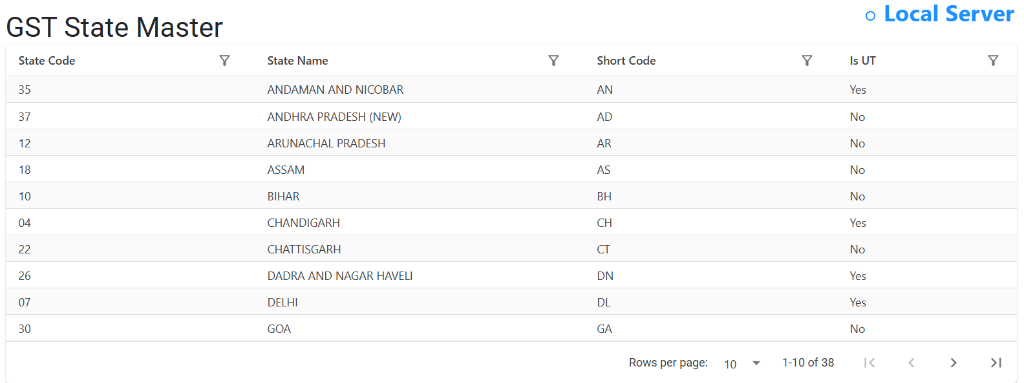
Browse GST States
The GST State Master Index provides a comprehensive directory of all operational regions.
- Legal Identifiers: Reference the State Code (the official 2-digit GST prefix) and Short Code for quick data entry.
- UT Classification: Identify Union Territories via the Is UT flag, which is crucial for UTGST tax processing.
- Regional Coverage: Easily navigate through the exhaustive list of 35+ regions to ensure your specific society or vendor location is correctly configured.
5. Validations and Error Handling ⚠️
- Missing State Code: If a member’s state is not set, the system might default to intra-state tax, which could be technically incorrect for NRI or out-of-state members.
- Invalid Code: The 2-digit code must match official GST portal standards.
6. Best Practices / Tips 💡
ℹ️
- Check NRI Members: For members residing abroad with registered addresses outside the society’s state, ensure their State is updated in the Member Master to ensure IGST is applied correctly.
- Verify Vendor States: When onboarding a new vendor, always verify their state code against their GST certificate.
- Official Codes: Never change the state codes (e.g., 27, 07, 33) as these are legally mandated by the GST department.