Minutes Book
Minutes Book Module - User Guide
⚡ Quick Start: 3-Minute Fast Track
For secretaries who need to record a meeting immediately:
- Header: Click Create Main, enter Meeting No, Type (AGM/SGM/MC), Date, and Venue.
- Attendance: Use Leave of Absence checklist to mark committee members as present or absent.
- Agenda: Go to Agenda Items, add discussion points and formal resolutions for each item.
- Finalize: Use Enhance with AI to polish the language, then click Confirm Minutes once the draft is approved.
🗺️ Meeting lifecycle
graph LR
    Agendas[Meeting Agenda Master] --> Header[Create Minutes Header]
    Header --> Attendance[Mark Attendance/Absence]
    Attendance --> Entry[Record Agenda Discussions]
    Entry --> AI[AI Language Enhancement]
    AI --> Confirm[Final Confirmation]
    Confirm --> PDF[Professional PDF Print]

    style Confirm fill:#f9f,stroke:#333,stroke-width:2px
✅ Prerequisites Checklist
Before recording minutes, ensure:
- Meeting Agenda Master: Standard agenda items are pre-defined.
- MC Member Master: Managing Committee members are correctly registered.
- Meeting Types: AGM, SGM, and MC meeting types are configured.
- AI Credits: Ensure AI Insights parameter is active for language enhancement.
1. Introduction 📝
The Minutes Book module is a specialized tool for society secretaries and managers to record, manage, and archive official meeting proceedings. It transforms messy handwritten notes into structured, professional documents.
Core Functionality:
- It maintains a Sequential Record of meetings, ensuring no meeting number is skipped.
- It facilitates Resolution Tracking, ensuring every decision is documented with a clear outcome.
- It integrates with AI Technology to help draft formal language from rough notes.
2. Managing Minutes 🚀
Accessing the Module
Navigate to System Tools > Minutes Book. Here you will find:
- Minutes Book Index: A chronological list of all recorded meetings.
- MC Members: Management of committee member profiles.
- Meeting Agenda: Centralized master for recurring agenda items.
The Index Page
The Index Page shows all minutes for the current year. You can:
- Filter by Type: Quickly find all AGM or MC minutes.
- Check Status: See which meetings are in Draft vs. Confirmed status.
- Drill Down: Click the Minutes No to view attendance and specific agenda discussions.
3. Features ✨
The Minutes Book is designed for legal robustness and administrative ease:
- 🤖 AI Language Enhancer: Convert bullet-point notes into formal, grammatically correct minutes with one click.
- 📅 Leave of Absence Tracking: Log which committee members attended and who provided a formal leave of absence.
- 🔗 Linked Agendas: Pull pre-defined items from the Agenda Master to save typing time.
- 📋 Resolution Numbering: Automatically tracks and numbers resolutions for easy reference in future audits.
- 🛡️ Confirmation Lock: Once confirmed (C), minutes cannot be edited, providing an “Immutable Record” for legal safety.
- 🖨️ Professional PDFs: Generates high-quality PDF reports including the society logo and formal signature blocks.
- 🔢 Meeting Continuity: Ensures that the “Next Meeting” is initiated before the “Current Meeting” can be formally closed.
4. Interface Walkthrough 🔄
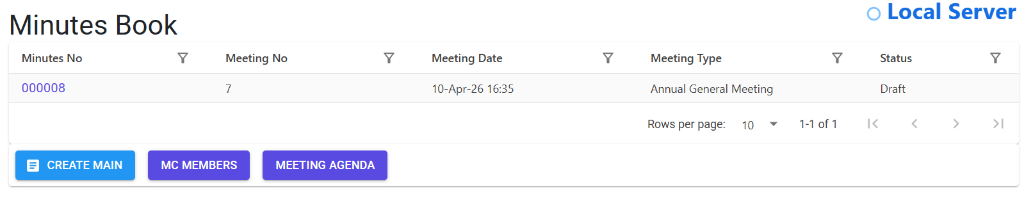
Minutes Book Index
The Index Page provides a professional overview of all meeting records. It allows secretaries to manage drafts, track confirmation status, and initiate new meetings.
- Filter & Search: Quickly locate meetings by type or date.
- Status Indicators: Differentiate between Draft and Confirmed minutes.
Minutes Details View
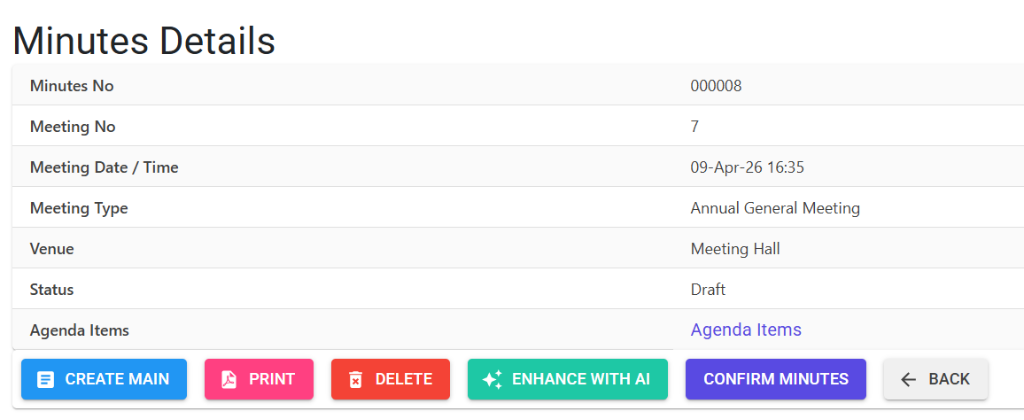
The Details View is the workspace for recording specific meeting proceedings. It centralizes attendance, agendas, and resolutions.
- Resolution Tracking: Formalize decisions taken during the meeting.
- AI Integration: Use the built-in tools to polish your notes.
5. Complete Flow 🔄
Record Meeting Header
- Choose the Meeting Type (e.g., Managing Committee).
- The system automatically suggests the Meeting No and Minutes No.
- Enter the Date, Time, and Venue.
Log Attendance
- Use the Leave Of Absence tool.
- Mark members as “Present” or “Absent”.
- Note if a formal letter of absence was received.
Process Agenda Items
- Add items from the master list.
- For each item, record:
- Discussion: Key points discussed.
- Resolution: The final decision taken by the committee.
AI Polishing (Optional)
- Click Enhance with AI to let the system refine your rough notes into professional prose.
Final Confirmation
- Review the draft. Once the committee approves, click Confirm Minutes.
- Note: The system will require you to create the next meeting draft before this one can be locked.
6. Validations and Error Handling ⚠️
| Validation Type | What is checked? | Error Message / Action |
|---|---|---|
| Continuity Check | If trying to confirm without a subsequent meeting record. | “Next minute needs to be created before confirming this.” |
| Modification Lock | If trying to edit a “Confirmed” record. | “Minutes are already confirmed, You may not modify or delete it.” |
| Line Item Check | If trying to delete a header that has agenda items. | “One or more Agenda items have been added, you may not delete it.” |
| Delete Reason | Ensures a mandatory reason is provided for deletions. | “Relevant reason needs to be filled (Upto 250 characters)” |
7. Tools / Smart Features 🔧
- 🏠 Attendance Auto-Fill: Remembers committee member names for quick marking.
- 🧠 AI Insight: Not just for grammar, the AI can help summarize lengthy discussions.
- 📄 PDF with Attendance: Optionally include the full attendee list at the end of the printed minutes.
- 🔍 Searchable Archive: Instantly find resolutions from years ago by searching for keywords in the index.
8. Reports Related to Minutes 📊
- 📄 Meeting Minutes (PDF): The official formal record of the meeting.
- 📋 Attendance Register: A summary report of committee attendance percentages.
- 📉 Pending Resolutions: A report showing items discussed but not yet resolved.
9. Best Practices / Tips 💡
- Draft Immediately: Try to enter rough notes in the system during or immediately after the meeting while memories are fresh.
- Standardize Agendas: Use the Agenda Master for recurring items like “Review of Previous Minutes” to maintain consistency.
- Use AI for Resolutions: Resolutions require precise legal language. Use the AI tool to ensure the wording is professional.
- Upload S3 Storage: Ensure confirmed minutes are synced to secure storage (S3) for long-term digital preservation.
10. Additional Observations 🔍
- Amendment Process: Once confirmed, any errors found must be addressed as an agenda item in the next meeting, rather than editing the original record.
- Mandatory Attendance: The system can flag if a quorum was not met based on MC Member settings.
- Deletion Impact: Deleting a record reverts the previous meeting back to “Draft” status to maintain the sequence.